
The 10 project statuses and what they mean
Each project has a status. The 10 statuses are designed to match how painting work actually flows, and they control what actions are available at each stage.
The 10 statuses
- Lead — a potential job, usually from the lead widget. No scoping yet.
- Measuring — you're on site, measuring and assessing.
- Quoted — measuring is done, quote is built but not yet sent.
- Quote sent — quote is with the client, waiting for their decision.
- Won — the client has accepted. Surfacely auto-creates the deposit invoice if you've set one.
- In progress — the crew is on the job. Updates, variations, and progress invoices happen here.
- On hold — paused for a reason (weather, client delay, supply issue).
- Complete — work is done, final invoice issued, drip emails run. Permanent state.
- Lost — the client chose someone else, or cancelled.
- Archived — hidden from the default pipeline view, but permanently stored.
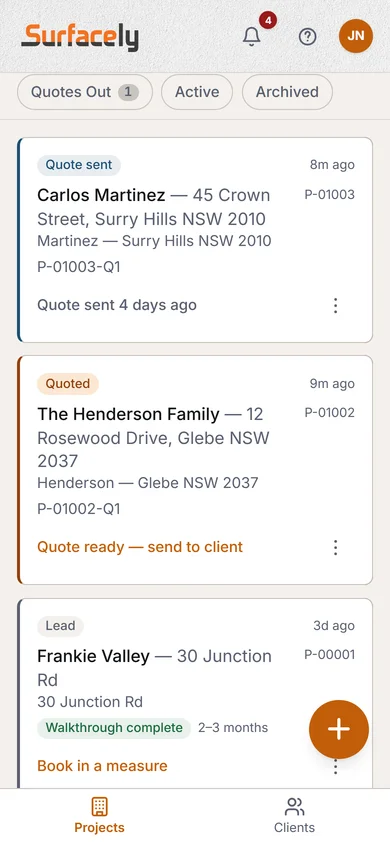
Valid transitions
Not every transition is valid. You can go from Quote sent to Won (client accepts) or to Lost (they don't). You can't skip from Lead to Complete. Surfacely enforces valid transitions in the Status picker so you can't accidentally move a job to a stage that doesn't make sense.
Pipeline views
The Projects page doesn't split into per-status tabs. Instead it groups everything by what needs you: Needs attention → Starting soon → In progress → Pipeline, so the jobs waiting on an action float to the top. Archived and lost projects sit behind a single Show archived toggle — out of the way until you go looking for them.
Why it matters: a well-maintained pipeline is the difference between a painter who's always chasing work and one who's always got a queue. One glance at the Projects page should tell you exactly how busy you are next week, next month, and next quarter.
Tip: move projects out of "Quote sent" promptly — either up to Won or across to Lost. Stale "Quote sent" projects distort your conversion rate and clog the pipeline view.
→ Go to your projects pipeline