
How to Manage a Painting Project: Complete Lifecycle Guide
A painting project has nine distinct stages from first call to final review. Painters who run the full lifecycle — with the right document at each step — close more jobs at higher margins, get paid faster, and earn the reviews that drive the next ten leads. Skip steps and the gaps come back as disputes, late payments, or callbacks the painter has to absorb at no charge.
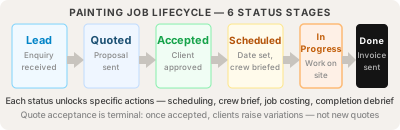
The 9 stages of a painting project
1. Site assessment and surface measurement
Visit the building. Measure every paintable surface using the formula for that surface type. Capture defect photos and notes. Identify hazards, access constraints, and any prep beyond standard. This is where the surface register is built — a permanent record tied to the building.
Documents produced: assessment record with photos, measurement record per area, condition notes per surface.
2. Quote generation and client proposal
Run the cost-plus formula across labour, materials, access, prelims, and overheads. Build a branded proposal that explains the scope, the surfaces being painted, the products being used, and the warranty terms. The proposal is what the client actually reads — the quote is what the proposal is built on.
Documents produced: quote PDF with itemised breakdown, branded proposal with cover page and terms.
3. Quote acceptance and project activation
The client opens the proposal link, reviews it, and accepts. Surfacely records who accepted, when, and from where — a tamper-proof audit trail if the job is ever disputed. Once accepted, the quote is locked for good: no edits from either side. The project moves from "Quoted" through "Sent" to "Won" and the active job kicks off.
Documents produced: acceptance record with audit trail.
4. Crew brief and safe work plan
Generate the crew brief — the painter's site bible. It includes scope summary, surface list, access plan, hazard register, and the safe work plan for your region (SWMS in Australia, JHA in the US, RAMS in the UK, SSSP in New Zealand). Surfacely automatically flags 12 painting-specific hazards from the job details so nothing gets missed. On site, the crew scans a QR code to confirm they've read and understood the plan.
Documents produced: crew brief PDF, safe work plan with risk matrix, sign-off register.
5. Job management — progress, updates, variations
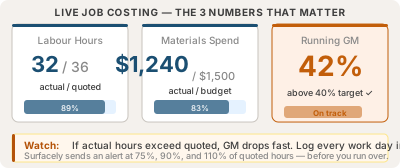
Daily progress updates with photos. Time logging on labour. Material purchase capture so the actual material cost feeds back into job profitability. If the scope changes, raise a Variation — Addition for extra work, Reduction for removed scope. The client approves through the portal.
Documents produced: daily updates, time log entries, material purchase records, variation documents (numbered).
6. Invoicing — deposit, progress, and final
Deposit invoice raised on quote acceptance (often auto-generated). Progress invoices as scheduled or at percentage milestones. Final invoice on completion. Each invoice opens in a portal where the client pays via Stripe or sees bank transfer details.
Documents produced: deposit invoice, progress invoices (sequence-numbered), final invoice.
7. Completion sign-off and client portal
Painter marks job complete. Client gets a portal link to confirm completion — they walk through the work, raise any defects (which become call-back items, not new variations), and sign off. The completion event timestamps the warranty start date.
Documents produced: completion confirmation, defect log (if any), warranty register entry.
8. Post-completion drip — getting paid faster and getting reviews while the work is fresh
Once the painter marks a job complete, four emails go out automatically over the next month — each one branded as the painter's business, not Surfacely's. Day 0: a thank-you sent the moment the job closes, while the client's positive feeling about the new paint is at peak. Day 7: the review request — a one-click link straight to the painter's Google review profile. This is the highest-converting moment for an honest review. Day 14 and Day 30: if the client still owes money, friendly-then-firm payment reminders go out automatically — no awkward phone calls, no chasing. The Day 14/30 reminders only fire when there's an outstanding balance, so paid-up clients don't get nagged. The painter can turn the whole drip off, or change the timing, in their business email settings.
Documents produced: drip email log per project — the painter can see exactly which emails went, when, and to whom.
9. The permanent surface register — re-quote without re-measuring
The building stays on file with all its surfaces, dimensions, and history. When the same client (or a new owner) needs another quote in 5 years, the painter doesn't re-measure — they re-quote against the existing surface register, adjusting only what's changed. This is the long-tail value of running every job through the system.
Documents produced: updated surface register, new quote against existing measurements.
Project status flow
Surfacely tracks projects through 10 status states. The flow is one-directional for most transitions; only Lost and Archived are restorable.
| Status | What it means | Typical next status |
|---|---|---|
| Lead | Initial enquiry captured, no scoping yet | Scoping |
| Scoping | Site assessment and measurement in progress | Quoted |
| Quoted | Quote built but not sent to client | Sent |
| Sent | Proposal sent, awaiting client decision | Won / Lost |
| Won | Quote accepted, project activated | In Progress |
| In Progress | Job in execution | Complete / On Hold |
| Complete | Work finished, awaiting client sign-off | Archived |
| On Hold | Paused (weather, client delay, supply) | In Progress |
| Lost | Quote declined or client gone silent | Archived |
| Archived | Project closed in records | — |
Invoice types in a painting project
| Invoice type | When sent | Typical % of quote |
|---|---|---|
| Deposit | On quote acceptance | 20–50% (residential), 10–25% (commercial) |
| Progress | At milestones during job | 30–40% per stage |
| Final | On completion sign-off | Remaining balance after deposit + progress |
| Variation | When variation approved | 100% of variation amount |
What is a variation in a painting job?
A variation is scope change after the quote is accepted. Two flavours:
- Addition. Extra work the client wants — repaint a fence that wasn't in the original scope, add a feature wall, change colour to a more expensive product. Priced as positive amount, increases project total.
- Reduction. Removed scope — client decides to leave one bedroom unpainted, or pulls the soffit work because they're getting it replaced. Priced as a negative amount that comes off the project total automatically.
Surfacely never allows direct edits to an accepted quote. The variation flow is the only legitimate path. Each variation gets a sequence number (your business's first variation is V001, then V002, etc.) and a separate approval document.
Related guides
FAQ
How do I manage a painting project professionally?
Run the 9-stage lifecycle: assessment → quote → proposal → acceptance → crew brief → progress → invoicing → completion → review. Document at each step.
What is a project portal for painting contractors?
A branded link the client uses to view documents — quote, proposal, variations, invoices, completion. Single access token, no client account needed.
When should I send a deposit invoice for a painting job?
Immediately on quote acceptance — Surfacely auto-generates it. 20–50% residential, 10–25% commercial.
What is a painting job variation?
Scope change after acceptance. Addition (extra work) or Reduction (removed scope). Sequence-numbered, client-approved through the portal. Never edit the accepted quote directly.
How do I collect a Google review after a painting job?
Day 0 thank-you, then Day 7 review request with a one-click Google review link. Days 14 and 30 in the same sequence are friendly-then-firm payment reminders that only fire if money is owed. Day 7 is the highest-converting moment to ask, while the work is fresh.
What documents does a painting contractor need for a job?
Assessment, measurement, proposal, accepted quote, deposit invoice, crew brief with safe work plan, progress updates, variation docs (if any), progress and final invoices, completion confirmation, warranty entry.