
Building a quote
Once a building is scoped, turning it into a quote is a guided review: check the numbers, adjust, send. Surfacely does the arithmetic; you do the judgement.
1. Review the surfaces
The quote builder is a single-expand walkthrough — it opens on a collapsed Areas summary so you can see the whole job at a glance, then you step through each section in turn. Every measured surface is there, grouped by area, showing m², hours, L of paint, and the line total in $. Anything flagged (wash-only, significant defects, after-hours work) shows a badge so you can see it at a glance.
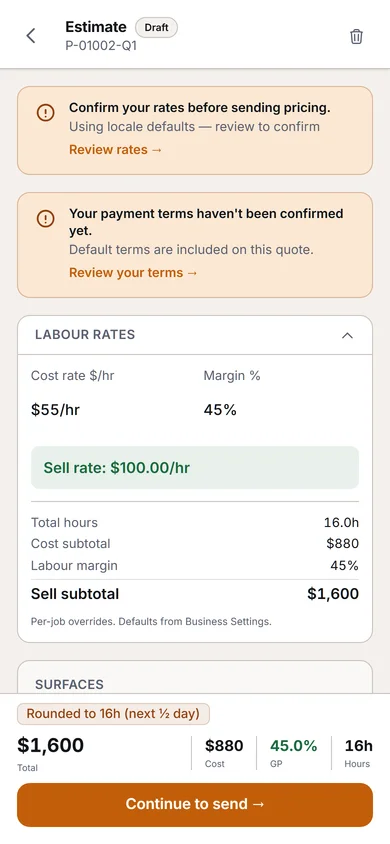
2. Adjust if needed
Common adjustments:
- Add hire — scaffolding, lifts, pressure washer
- Add prelims — extra masking, floor protection, skip hire
- Material cost overrides — if the client specified a premium paint, override that category's cost for this quote only
- After-hours split — if part of the job is outside business hours, set the percentage
- Adjustment — a final round-up or round-down to hit a target number. Surfacely shows the resulting margin so you can see what you're giving up.
If the job has cabinets, you can also show the client a Price per door and drawer front for them. It is a checkbox under Display settings, off by default, and is worked out from the real price of the cabinet line. See Painting cabinets.
3. Readiness review
Before you send, Surfacely runs a readiness check — a set of cards that surface issues you might want to address: high travel distance, occupied building, significant defects. Each card is actionable in place.
4. Send
Send by email (branded template with your logo and colour), or copy a portal link the client can open. The client can accept the quote with one tap in the portal.
Why it matters: painters who build quotes in spreadsheets lose hours formatting and double-checking math. Surfacely's flow is quote-in-minutes. Time you save here is time you spend in front of the next client.
Tip: the quote builder supports Cmd+S (Mac) / Ctrl+S (Windows) to flush changes immediately. Use it as a confidence save when you've made a big adjustment.